Logo
  • Products
    • DW Ai IP Products IP Cameras Recorders Network Devices Software Mobile Apps HD Over Coax® / Analog Products Star-Light Plus™ Cameras Recorders Network Devices Software Mobile Apps View Catalog
      IP Cameras
      MEGApix® Ai Logo
      MEGApix® Ai ALPR Logo
      MEGApix® Ai PTZ Logo
      MEGApix® Ai CloudCam Logo
      MEGApix® Ball Turret Cameras
      MEGApix® Bullet Cameras
      MEGApix® Indoor Dome Cameras
      MEGApix® Outdoor Dome Cameras
      MEGApix® InterCam™ Logo
      MEGApix® V-CLASS Cameras Logo
      MEGApix® White Light Cameras Logo
      MEGApix® Height Strip Camera Logo
      MEGApix® Pinhole Camera Logo
      MEGApix® Panoramic Cameras Logo
      MEGApix® PTZ™ Cameras Logo
      MEGApix® DMP™ Cameras
      DW Active Deterrent Solutions
      Product Calculator

      Determine the necessary bandwidth and storage you need to operate our products.

      Accessories

      View the entire collection of mounting brackets, junction boxes and specialty mounting accessories.

      Product Selector

      Let DW help you find what you need.

      Product Demos

      View DW’s software, recorders and cameras in action.

      DW® Warranty

      Learn more about our product warranty.

      ON SALE

      Clearance Zone
      Surveillance Kits

      Recorders
      Blackjack Ai Servers and Appliances Logo
      Blackjack Servers Logo
      COVA Logo
      VMAX IP G4 NVRs Logo
      Product Calculator

      Determine the necessary bandwidth and storage you need to operate our products.

      Accessories

      View the entire collection of mounting brackets, junction boxes and specialty mounting accessories.

      Product Selector

      Let DW help you find what you need.

      Product Demos

      View DW’s software, recorders and cameras in action.

      DW® Warranty

      Learn more about our product warranty.

      ON SALE

      Clearance Zone
      Surveillance Kits

      Network Devices
      Blackjack® Workstations
      Compressor™ Encoders Logo
      DW® Spot™ Monitoring Stations
      SITEWATCH™ PERIMETER PROTECTION Logo
      SITEWATCH™ SPEAKER Logo
      DW Active Deterrent Solutions
      PoE Extender Splitter
      Product Calculator

      Determine the necessary bandwidth and storage you need to operate our products.

      Accessories

      View the entire collection of mounting brackets, junction boxes and specialty mounting accessories.

      Product Selector

      Let DW help you find what you need.

      Product Demos

      View DW’s software, recorders and cameras in action.

      DW® Warranty

      Learn more about our product warranty.

      ON SALE

      Clearance Zone
      Surveillance Kits

      Software
      myDW Logo
      DW® IP Finder
      DW Spectrum® IPVMS Logo
      DW Cloud
      C3 CMS Logo
      View all
      Product Calculator

      Determine the necessary bandwidth and storage you need to operate our products.

      Accessories

      View the entire collection of mounting brackets, junction boxes and specialty mounting accessories.

      Product Selector

      Let DW help you find what you need.

      Product Demos

      View DW’s software, recorders and cameras in action.

      DW® Warranty

      Learn more about our product warranty.

      ON SALE

      Clearance Zone
      Surveillance Kits

      Mobile Apps
      DW Spectrum® Mobile
      DW Mobile Plus™
      DW Witness™
      VMAX® Mobile™
      Product Calculator

      Determine the necessary bandwidth and storage you need to operate our products.

      Accessories

      View the entire collection of mounting brackets, junction boxes and specialty mounting accessories.

      Product Selector

      Let DW help you find what you need.

      Product Demos

      View DW’s software, recorders and cameras in action.

      DW® Warranty

      Learn more about our product warranty.

      ON SALE

      Clearance Zone
      Surveillance Kits

      Star-Light Plus™ Cameras
      Star-Light Plus™ Ball Turrets Cameras
      Star-Light™ Bullet Cameras
      Star-Light™ Indoor Dome Cameras
      Star-Light™ Outdoor Dome Cameras
      Product Calculator

      Determine the necessary bandwidth and storage you need to operate our products.

      Accessories

      View the entire collection of mounting brackets, junction boxes and specialty mounting accessories.

      Product Selector

      Let DW help you find what you need.

      Product Demos

      View DW’s software, recorders and cameras in action.

      DW® Warranty

      Learn more about our product warranty.

      ON SALE

      Clearance Zone
      Surveillance Kits

      Recorders
      VMAX® A1 G4™ DVRs Logo
      Product Calculator

      Determine the necessary bandwidth and storage you need to operate our products.

      Accessories

      View the entire collection of mounting brackets, junction boxes and specialty mounting accessories.

      Product Selector

      Let DW help you find what you need.

      Product Demos

      View DW’s software, recorders and cameras in action.

      DW® Warranty

      Learn more about our product warranty.

      ON SALE

      Clearance Zone
      Surveillance Kits

      Network Devices
      Compressor™ Encoders Logo
      DW® Spot™ Monitoring Stations
      Product Calculator

      Determine the necessary bandwidth and storage you need to operate our products.

      Accessories

      View the entire collection of mounting brackets, junction boxes and specialty mounting accessories.

      Product Selector

      Let DW help you find what you need.

      Product Demos

      View DW’s software, recorders and cameras in action.

      DW® Warranty

      Learn more about our product warranty.

      ON SALE

      Clearance Zone
      Surveillance Kits

      Software
      C3™ CMS Logo
      View All
      Product Calculator

      Determine the necessary bandwidth and storage you need to operate our products.

      Accessories

      View the entire collection of mounting brackets, junction boxes and specialty mounting accessories.

      Product Selector

      Let DW help you find what you need.

      Product Demos

      View DW’s software, recorders and cameras in action.

      DW® Warranty

      Learn more about our product warranty.

      ON SALE

      Clearance Zone
      Surveillance Kits

      Mobile Apps
      DW Mobile Plus™ App
      DW SiteViewer™ Apple TV
      VMAX® Mobile™
      Product Calculator

      Determine the necessary bandwidth and storage you need to operate our products.

      Accessories

      View the entire collection of mounting brackets, junction boxes and specialty mounting accessories.

      Product Selector

      Let DW help you find what you need.

      Product Demos

      View DW’s software, recorders and cameras in action.

      DW® Warranty

      Learn more about our product warranty.

      ON SALE

      Clearance Zone
      Surveillance Kits

      Product Calculator

      Determine the necessary bandwidth and storage you need to operate our products.

      Accessories

      View the entire collection of mounting brackets, junction boxes and specialty mounting accessories.

      Product Selector

      Let DW help you find what you need.

      Product Demos

      View DW’s software, recorders and cameras in action.

      DW® Warranty

      Learn more about our product warranty.

      ON SALE

      Clearance Zone
      Surveillance Kits

  • Solutions
  • Company
    • Company
      Meet DW®
      Complete IP
      Complete HD over Coax
      Contact Us
      Management
      Careers
      Warranty
      Terms and Conditions
      Cybersecurity
      Statement of Privacy
      Compliance and Industry Standards
      My Watchdog
      DW® Logo Merchandise
      Case Studies
      Testimonials
      Unauthorized Dealer Policy
      Webinars
      DW is Built for Users™
      News & Events
      Events Calendar
      Press Releases
      Blog
  • University
  • Sales
    • Contacts Schedule a Demo Project Registration Strategic Distributors
    • Analog/IP
      Analog/IP
  • Partners
    • Partner Login
      Become a Partner
      Technology Partners
      Channel Partner Program
      Technology Partners
      A&E Partners
      Strategic Distributors
  • Support
  • PRODUCTS
    • DW Ai
    • IP Products
      • IP Cameras
        • MEGApix® Ai
        • MEGApix® Ai ALPR
        • MEGApix® Ai PTZ
        • MEGApix® Ai CloudCam
        • MEGApix® Ball Turret Cameras
        • MEGApix® Bullet Cameras
        • MEGApix® Indoor Dome Cameras
        • MEGApix® Outdoor Dome Cameras
        • MEGApix® InterCam™
        • MEGApix® V-CLASS Cameras
        • MEGApix® White Light Cameras
        • MEGApix® Height Strip Camera
        • MEGApix® Pinhole Camera
        • MEGApix® Panoramic Cameras
        • MEGApix® PTZ™ Cameras
        • MEGApix® DMP™ Cameras
        • DW Active Deterrent Solutions
      • Recorders
        • Blackjack Ai Servers and Appliances
        • Blackjack Servers
        • COVA
        • VMAX IP G4 NVRs
      • Network Devices
        • Blackjack® Workstations
        • Compressor™ Encoders
        • DW® Spot™ Monitoring Stations
        • SITEWATCH™ PERIMETER PROTECTION
        • SITEWATCH™ SPEAKER
        • DW Active Deterrent Solutions
        • PoE Extender Splitter
      • Software
        • myDW
        • DW® IP Finder
        • DW Spectrum® IPVMS
        • DW Cloud
        • C3 CMS
        • View all
      • Mobile Apps
        • DW Spectrum® Mobile
        • DW Mobile Plus™
        • DW Witness™
        • VMAX® Mobile™
    • HD Over Coax® / Analog Products
      • Star-Light Plus™ Cameras
        • Star-Light Plus™ Ball Turrets Cameras
        • Star-Light™ Bullet Cameras
        • Star-Light™ Indoor Dome Cameras
        • Star-Light™ Outdoor Dome Cameras
      • Recorders
        • VMAX® A1 G4™ DVRs
      • Network Devices
        • Compressor™ Encoders
        • DW® Spot™ Monitoring Stations
      • Software
        • C3™ CMS
        • View All
      • Mobile Apps
        • DW Mobile Plus™ App
        • DW SiteViewer™ Apple TV
        • VMAX® Mobile™
    • View Catalog
  • Solutions
  • Company
    • Company
      • Meet DW®
      • Complete IP
      • Complete HD over Coax
      • Contact Us
      • Management
      • Careers
      • Warranty
      • Terms and Conditions
      • Cybersecurity
      • Statement of Privacy
      • Compliance and Industry Standards
      • My Watchdog
      • DW® Logo Merchandise
      • Case Studies
      • Testimonials
      • Unauthorized Dealer Policy
      • Webinars
      • DW is Built for Users™
    • News & Events
      • Events Calendar
      • Press Releases
      • Blog
  • University
  • Sales
    • Contacts
    • Schedule a Demo
    • Project Registration
    • Strategic Distributors
  • Partners
    • Partner Login
    • Become a Partner
    • Technology Partners
    • Channel Partner Program
    • Technology Partners
    • A&E Partners
    • Strategic Distributors
  • Support
Request Demo Download Catalog Channel Partner Portal
Partner Portal Book a Demo
Portal Demo

Search Keywords

What’s new in DW Spectrum 6.1

Release Notes · DW Spectrum Overview

DW Spectrum 6.1 New Fearures

DW Spectrum Enterprise Exclusive! Bookmarks Sharing via DW Cloud or App

Enterprise users can share bookmarked videos via a link for faster collaboration and improved data accessibility, allowing users to share videos with people inside and outside the Organization. Securely sharing bookmarks with other users and collaborators can enhance workflow efficiency and speed up response to events. 

DW Spectrum Enterprise Exclusive! Cross-Site Layouts

Users can create customized layouts with devices and servers from multiple organizations, helping administrators and monitors get an at-a-glance live view across locations, organizations, and servers, with single-device object search, web pages and local files, and two-way audio.

DW Spectrum Enterprise Exclusive! Maps Now Live!

Maps are officially live! Show your device locations on a live map, an uploaded image, or a PDF. Search the embedded map for an address and select the devices to assign to that location. Cameras can be adjusted to show direction and coverage, and linked to other maps and floor plans for more details.

DW Spectrum Enterprise Exclusive! Organization User Management via the Desktop Client

Organization owners can manage all users in the Organization via the DW Spectrum Desktop Client, simplifying operations by consolidating organization management and video monitoring in a single interface.

Enterprise Exclusive! Re-streaming between sites

Re-streaming traffic between Sites allows users to add streams from Sites that belong to different Organizations, especially helpful when adding a Blackjack Ai Server on the same network.

Blackjack CX PoE Management

Easily monitor and manage your Blackjack CX remotely with real-time visual insights into PoE status, connected devices, port activity, and power usage from the Desktop Client, giving you full control to optimize performance and keep your network running smoothly.

Direct Remote Support Access

Technical support specialists can access servers via remote access software such as SSH, RDP, TeamViewer, etc., without additional port forwarding.

Import Data from Device

DW Spectrum servers can now pull recorded video from devices via ONVIF profile G in the event of network or power loss, recovering missing data from the device's local backup recordings, giving users the added benefit of recovering locally stored video in case of power or network loss.

Object and Generic Search Lists

Under the new Event Rules Engine, users can set a group of attributes that must be met for an action to be triggered. Set up a detailed search based on multiple attributes that must be met, triggering a gate or access to vehicles, objects or people who match the established attributes.

Revamped Event Rules Engine

A new, more user-friendly Event Rules Engine adds search by trigger name and event parameters, and improves generic HTTP actions and requests. The new Event Rules Engine improves functionality and empowers users to set more detailed rules to activate certain triggers.

Shared Layouts as Hotspot Targets

Hotspots let users link cameras so that when an event occurs on one camera, another device can automatically appear in view, improving situational awareness. With version 6.1, users can now assign a hotspot to open a shared layout, providing an even more comprehensive view of the scene during an event.

Direct3D Rendering on Windows

The Desktop Client is rendered with Direct3D on Windows to help resolve issues with OpenGL rendering.

GPU Usage for Hardware Decoding

Servers can use Intel or NVIDIA GPUs for hardware decoding (e.g., motion detection).

WebRTC Support

WebRTC streams (mostly used by Android-powered cameras) can be added to the Server. WebRTC reduces latency in streaming video and audio from the camera and provides browser-based access without additional plugins.
What’s new in DW Spectrum Pro 6.0.6

Release Notes · DW Spectrum Overview

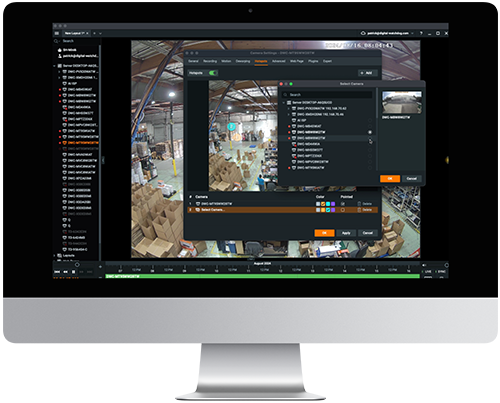
Camera Hotspots

Expand your vision with the ability to layer interactive icons over live video feeds. With Hotspots, you can instantly view a linked device without the need to open a new layout or search for a specific camera. Add a hotspot icon in the camera's settings and link it to the relevant camera, device or layout. When you hover over the hotspot icon, a popup view of the linked device will appear. You can also expand it as a new view in our current grid.

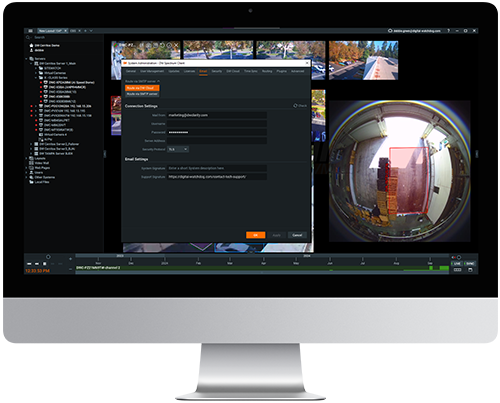
Emails via DW Cloud™

New under the email settings, system administrators can choose to route emails through DW Cloud™ alongside the existing SMTP email routing option. If selected, when the media server needs to send an email, it will send the API requests to the notifications service instead of using SMTP settings.
Enhanced Lightweight Directory Access Protocol (LDAP) Integration

Streamline user access management and eliminate manual updates with an enhanced LDAP integration. System Administrators can easily manage permissions for all company services in one place, ensuring quick and efficient onboarding of new employees.
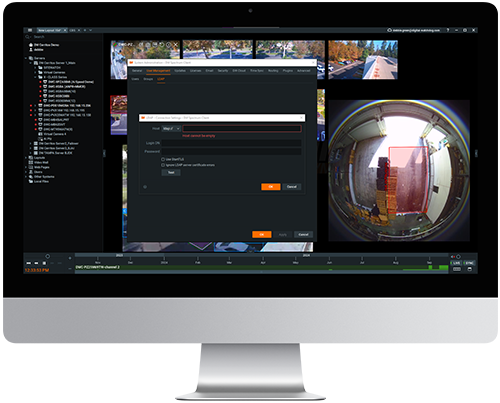

  • With continuous synchronization, administrators can add a new user to the LDAP database and grant them access to the VMS immediately.
  • User permissions carry over from the LDAP database.
  • LDAP groups are now supported on the VMS side.


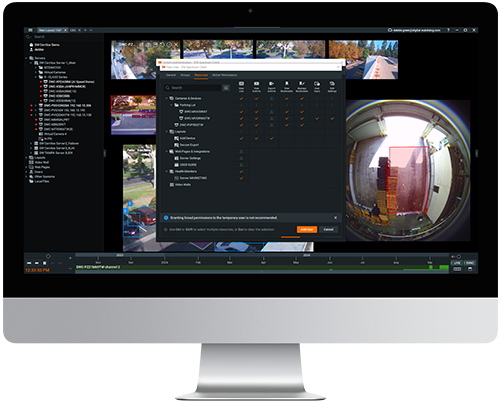
Improved and Redesigned User Management

With DW Spectrum Pro 6.0, administrators can craft permissions for both groups and individual users. Users can also belong to multiple groups, providing unparalleled control over user management.

NVIDIA Hardware Video Decoding Acceleration

DW Spectrum 6.0 can leverage NVIDIA GPUs’ advanced capabilities for video decoding, ensuring your security system operates at peak efficiency.


Key Benefits

  • Enhanced Performance
  • Lower CPU Usage
  • Smoother Video
  • Playback


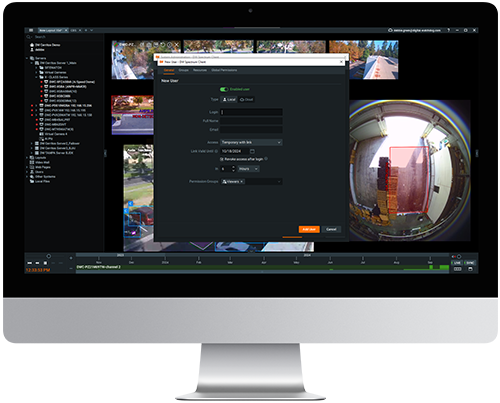
Temporary Users

System Administrators can effortlessly create temporary users for time-limited access. Temporary users have usage restrictions and their access to the systems revoked once the set time expires. This feature is set up in the local users tab.
What’s new in DW Spectrum® IPVMS v5.1.5

Release Notes · DW Spectrum Overview

Camera Replacement

A simple, straightforward way to replace an IP camera.
  • Name, archive, general and advanced settings, recording settings, PTZ settings, event rules, analytics, and camera access rights will be transferred to a new camera.
  • Motion Detection settings and 2-way Audio will not be transferred.
  • The current archive from the old camera will still be accessible.
  • The camera must be on the same Server.

Cross-System Layouts

Operators with rights to multiple Systems can now combine cameras from Cloud-connected Systems into a single Layout.
  • Create a layout.
  • Compatible systems in the Resource Panel will have nested cameras.
  • Drag a camera onto the Viewing Grid and save.

ONVIF Profile Selection

Added a possibility to choose the specific ONVIF profile for cameras (the “Expert” tab). The ONVIF profile list is determined when adding the camera to the server.
Remote Client and Server Log Download

Users can now download Desktop Client and Server logs remotely via the Desktop Client.

  • While in the Desktop Client, navigate to the System Administration dialog and then click on the Advanced tab.
  • In the left panel, choose Logs Management and use the checkboxes to select the log(s) you want to download.

What’s new in DW Spectrum® IPVMS 5th Generation

Release Notes · DW Spectrum Overview

Archive Encryption

Archives on any hard drive or storage medium can be encrypted and viewable only on the Desktop, Mobile, and Web clients.

Audio Video Mapping

Combine audio and video from different devices. For example, an audio source from a camera with a microphone can be used as an audio source for another camera. Two-way audio button can be placed on a camera without a microphone and used with a different camera that has a speaker attached to it.

Dewarping for Panoramic Cameras

360° panorama images and videos that use equidistant projection can now be dewarped in the desktop client.

Embedded Javascript API

Client JavaScript API embedded in Web Pages to enable additional functionality such as opening and closing cameras and playing and pausing video.

Independent Desktop Client Updates

The client desktop distributive can be released separately from the server distributive. The client can also automatically download and install the latest version of the desktop client to be compatible with the server’s version.

More Secured Connections

All Blackjack® servers powered by DW Spectrum IPVMS use SSL/TLS Certificate pinning to render man-in-the-middle (MITM) attacks impossible.

New Archive Backup Options

Archives can now be backed up based on Motion, Bookmarks, Objects and any combination of them (M &O or O &B, or M, B & O).

New recording modes

Added to the Recording Schedule the following new recording modes: Object only, Object + Low res, Motion + Object and Motion + Object + Low res. On cameras with recording enabled, the last-minute of the recording is now available for playback in the Desktop Client.

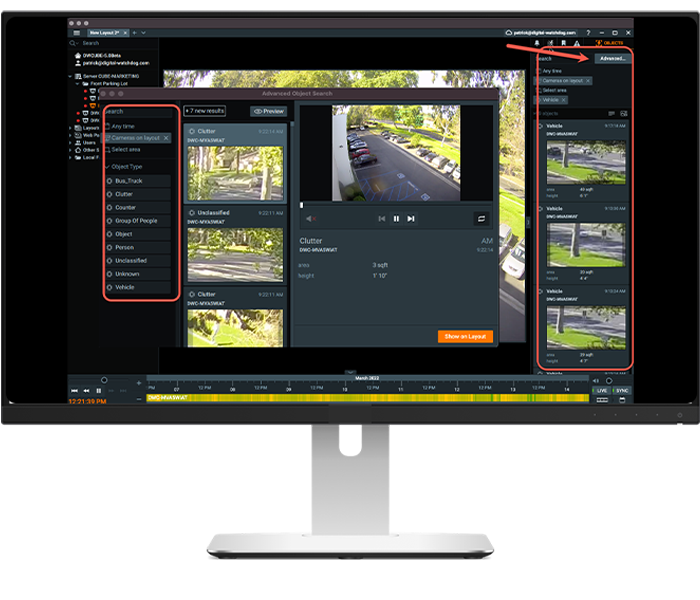
Object Panel Redesign

Search for objects identified by analytics and stored in video archives by attributes (e.g., object type, color, gender, age, clothing, etc.) in a new pop-out window.
Redesign Desktop Client Welcome Screen

Users can now adjust the information presented in the welcome screen to sort systems by priority, show all or part of the systems available and search for systems by attributes.

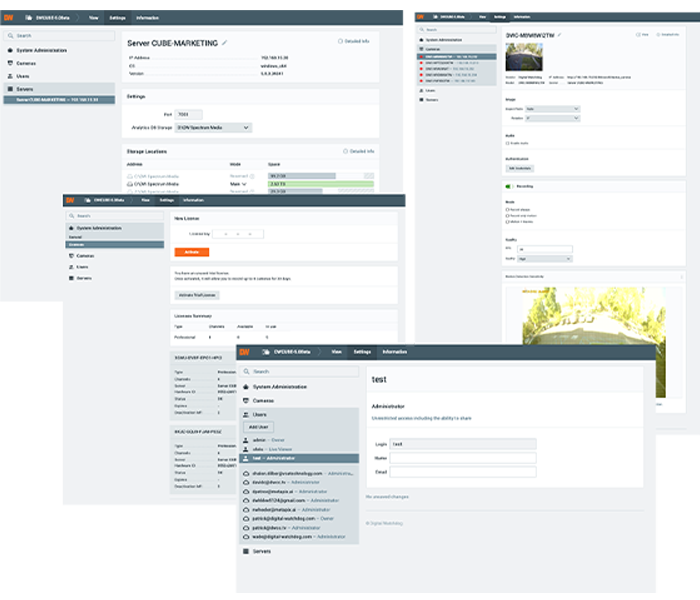
Redesigned Server Web Admin

Server Web Admin interface allows administrators to add and remove users, as well as view detailed information about Servers, Cameras, and Licenses.
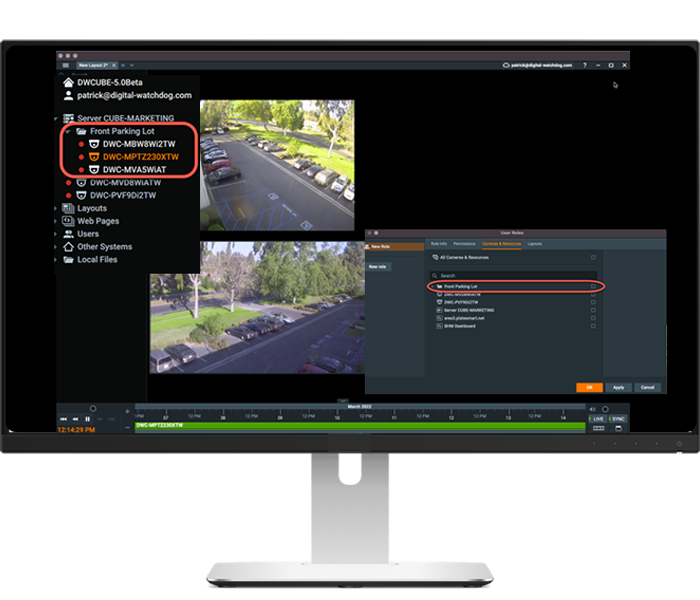
Resource Grouping

Group resources (cameras, streams, encoders, web pages) in the DW Spectrum IPVMS Desktop to be used in roles and permissions, and for faster navigation of large systems.
Restore Previous Session

Certain interface elements can be saved and restored upon launching the desktop client.

Session-Based Authentication

Servers and clients use bearer token authentication by default.

SSL/TLS Internet Requests

All Internet requests use OS SSL/TLS Certificate Validation to prevent MITM (man-in-the-middle) attacks, including but not limited to VMS updates, VMS-Cloud communications, license validation, statistics, etc.

Two-factor authentication

Multi-factor authentication helps prevent account hijacking due to stolen or misplaced credentials. It also prevents unwanted access from credentials left in orphaned remote clients on uncontrolled systems. For cloud users, OAuth2 authentication is used by default, which prevents a server owner from compromising a user’s Cloud password and renders Offline Cloud Login attacks impossible.

Video Preview Thumbnails

Hover over the timeline to preview video in thumbnail format in Windows and macOS Desktop clients.

Web Proxy via Server

Local device or service web pages can be proxied via the Server application and viewed via a remote connection.

ZFS Support

Added support for ZFS (Zettabyte File System) to the Server.

What’s new in DW Spectrum® IPVMS v4.2

Release Notes · DW Spectrum Overview

Native Support for MEGApix® IVA and IVA+ Cameras

New native support for MEGApix IVA and IVA+ IP cameras allow users to capture object metadata/events for automation in the rules engine.

Intel® Quick Sync Video for Desktop

Intel® Quick Sync Video uses the dedicated media processing capabilities of Intel Graphics Technology to decode and encode video.

  • Improves the Desktop performance on low power hardware (e.g. Intel Atom, Celeron).
  • Decode very high resolution (e.g. 16 MP, 32MP) cameras and streams.

Redesigned PTZ Controls

A new and improved way to control PTZ cameras that improves usability, especially in high latency situations with cameras that do not support advanced PTZ.
  • No more AIM overlay for improved visibility.
  • A new click, drag, and release control makes it easier to control PTZ cameras in higher latency situations.
  • Advanced PTZ controls activates when SHIFT key is pressed.

New Fisheye Lens Dewarping Options

Improve fisheye dewarping precision by selecting the most suitable lens projection type for your fisheye cameras.

  • Equisolid
  • Equidistant
  • Stereographic

DW Cloud™ Camera Settings Management

Users with appropriate rights can manage Camera Settings directly from DW Cloud, including:
  • Camera Orientation
  • Audio
  • Authentication
  • Motion Sensitivity

DW Cloud™ Server Settings Management

Users with appropriate rights can manage Server Settings directly from DW Cloud, including:

  • Rename server
  • Restart server
  • Change port

DW Cloud™ License Management

Users with appropriate rights can manage DW Spectrum licenses directly from DW Cloud, including:

  • View the license list
  • Activate licenses

DW Cloud™ User Management

Users with appropriate rights can manage DW Spectrum users directly from DW Cloud, including:
  • Authentication
  • Name
  • Role

What’s new in DW Spectrum® IPVMS v4.1

Release Notes · DW Spectrum Overview

2-Way Audio API

Allows third-party web clients to send audio (from client microphone) to and get audio from cameras.

Added Time Zone Option for Virtual Cameras

Time Zone can now be specified for virtual cameras. If “Time Zone” is set to “Auto”, then the time zone is defined by metadata or UTC if there’s no time zone specified in the file. If set to “Client”, the Time Zone is defined by the desktop client.

Additional action parameter placeholders for the “Do HTTP request” action

Placeholders can be added to the HTTP POST request body to be automatically replaced by the corresponding values from Analytics Event parameters. This feature is only applicable to Analytics and Generic Events. Placeholders syntax:
  • {event.cameraId} – replaced by the camera ID (e.g., {{{ad1d1b6c-7013-0049-6fd4-ff15450e4716}}}).
  • {event.cameraName} – replaced by the camera name (e.g., DWC-MB45WiAT).
  • {event.eventType} – replaced by the event type (e.g., stub.objectInTheArea or stub.lineCrossing).
  • {event.eventName} – replaced by the event name (e.g., Object in the area or Line crossing).
  • {event.caption} – replaced by the caption (e.g., “Line crossing - impulse event (caption)”).
  • {event.description} – replaced by the description (e.g., “Line crossing - impulse event (description)”).

Best Server Selection

Best Server Selection (while connecting to a Cloud-connected Multi-Server System):
  • In prior releases, Desktop Client would connect to a random available server via Cloud. Now Cloud connections are routed through the Server with the best uplink.
  • Added the ability for users to specify the preferred Server for connections. The configured Desktop Client will attempt to connect to the preferred Server first, and if it is not reachable, it will detect and connect via the Server with the best uplink.

Chromium Browser

New Embedded Browser - Desktop Client now uses a full-featured embedded Chromium browser (v.77.0.3865) to display web pages on layouts:

  • Download Files on Web-Page - the embedded browser in Desktop Client now supports downloading and saving files.
  • Cameras Web Page in Camera Settings Dialog - camera web pages can now be opened up in the Camera Settings dialog allowing users to configure/access camera web pages inside Desktop Client even when on a different Subnet (i.e., remote connections / outside the LAN / WAN). The Server acts as an HTTP(s) proxy from cameras to Desktop Clients.
Cloud Connectivity Improvement

Improved cloud connectivity in certain network environments.

Database Backups Recategorized

Database backups are now categorized into the following types:

  • Created after system merge.
  • Created after updates.
  • Initiated via API.
  • Scheduled.

Health monitoring Dashboard

Health Monitoring - Available in the Server Web Admin interface and Cloud Portal, Health Monitoring provides administrators detailed information about a System’s health, including, but not limited to:

  • Alerts - automatically detected/identified problems with a System.
  • System Info (# of servers, channels, storage located, users, and version).
  • Servers (storage detailed state, CPU usage, NICs state, hardware spec, etc.).
  • Cameras (online/offline state, resolution, fps, quality, firmware version, etc.).
  • Storage Locations (path, server, type, status, read/write rate, size, usage %).
  • Network Interfaces (name, server, state, IP address, I/O rates).
  • Desktop Clients connected to Servers.

macOS Performance Improvements

Improved MacOS performance and introduced an experimental setting to limit frame rate and reduce CPU load (see Local Settings -> Advanced).

Pin the Timeline in Full Screen Mode

  • When the Timeline is pinned it will remain fixed on the screen.
  • If the Timeline is pinned in fullscreen mode and the user leaves fullscreen it will be pinned for all cameras on the layout when the user returns to fullscreen mode.

Push Notifications

Create customized events to send push notifications to the mobile app. Finally! Push Notifications are here! That’s right. You can now send Push Notifications to DW Spectrum Mobile like a boss.

  • Use the Rules Engine to send Push Notifications to mobile devices based on analytic events, motion, soft triggers, and more!
  • Users can receive push notifications from multiple systems and turn on/off notifications as they please on their mobile device.
  • Users can create custom text for notifications in the Rules Engine via Desktop Client.
Server Side Motion Detection Improved

False positives detection introduced to increase accuracy of detected motion events (e.g., turning on/off lights or switching camera day/night mode are now likely to be ignored).
Video Wall Failover

If a Server with Video Wall licenses fails, the video wall continues working for 7 days. After that, it will be blocked with the error message “Not enough licenses”.
What’s new in DW Spectrum® IPVMS v4.0

Release Notes · DW Spectrum Overview

Up to 30 CaaS cameras in a single network

The maximum number of MEGApix® CaaS™ all-in-one edge cameras in a single system is increased to 30 cameras with DW Spectrum® v4.0 (all in the same local network using MEGApix® CaaS™ cameras only). Learn more.
Add device interface

A new, more flexible way to discover and assign devices.

C2P Integration

Integrate 38 new 3rd party systems and devices with C2P (Convergence to Pixels)’s middle-ware.

Cloud system merge

System owners can now merge systems together in the DW Cloud™ interface.

Custom watermark over video

Administrators can add operator names to live, recorded, and exported video as an option to prevent and discover leaked video.

Dual stream RTSP / HTTP

Create dual-streaming “cameras” from legacy products.

Failover on storage failure

Failover now works when all storage drives on a server fail.
H.265 support for ONVIF cameras

H.265 support has been extended to include all ONVIF-compliant devices.

Launch desktop client with CLI

The desktop client can now be launched using the Command Line Interface (CLI).
Layout-as-an-action

Automate opening layouts in the rules engine.

Metadata SDK

Enables seamless, semantic integrations between with 3rd party AI-powered video analytics like VisionLabs
Minimum grid size on layouts

Added option to set a minimum viewing grid size.

Notifications panel

The new panel now includes notifications, motion events, bookmarks, events and objects!

Optimized system update

Upgrade process now includes desktop application installed packages and has been optimized for large multi-server system.

Plugins

Plugins allow seamless integration between DW Spectrum® IPVMS and 3rd party systems, pulling in object data and associated bounding boxes, paths and metadata tags.
Resource panel

A newer, cleaner resource panel experience.

Secure connections and encrypted video

Allow only secure connections and encrypt video and traffic between servers and clients.

Secure export

Password protect exported video.

Virtual camera (import offline video)

Create a virtual camera and import offline video to archive. Great for action cameras, wearable cameras, offline cameras).

Webcam support

USB webcams, laptop cameras and even the Raspberry Pi camera module will all now be auto-discovered and can be recorded and streamed.

What’s new in DW Spectrum® IPVMS v3.2
What’s new in DW Spectrum® IPVMS v3.1

Are You Ready to Start?

Technical Support
CPP and VSaaS Registration
Sales Support
Contact Technical Support VSaaS Registration & Support Contact Sales Schedule a Demo
Complete the form below and a DW® representative will be in touch.
I am a:*
Other*

Thank you so much for your message!

Your request is being submitted. Please do not refresh the page or close it.

Required information is missing. Please fill in the indicated fields and resubmit.

Logo
Complete Surveillance Solutions
Looking for Something?
Join Our Email List | Submit a Testimonial | Submit a Case Study
Book a Demo
SOLUTIONS
Product Calculator
Accessories
Product Selector
Product Demos
SOC_NonCPA_Blk
PRODUCTS
IP Cameras
IP Recorders
UHDoC Cameras
UHDoC Recorders
Network Devices
Software
Mobile Apps
View Catalog
News & Events
Events Calendar
Press Releases
Blog
COMPANY
Meet DW®
Contact Us
Management
Careers
Warranty
Terms and Conditions
Statement of Privacy
Unauthorized Dealer Policy
SALES
Contacts
Schedule a Demo
Project Registration
Partners
SUPPORT
DW Spectrum IPVMS Camera Compatibility List
VMAX IP Plus Camera Compatibility List
Knowledgebase
DW University
Resource Library
DW Calculator
© DW® 2026. All rights reserved. SiteMap | Privacy Policy
Do you like cookies? 🍪 We use cookies to ensure you get the best experience on our website. Learn more